
INDUSTRY GUIDE - RETAIL
SMS Marketing for Retail: How Stores and Online Shops Drive Repeat Sales by Text
Shoppers act on texts fast, which makes texting one of the best ways for retailers to announce sales, bring customers back and reward loyalty. This guide covers how retail stores and online shops build a text list, what to send and how to stay compliant, with results from real retail clients.
Updated October 2026 · 7 min read · 12 templates
Why SMS marketing works for retail
Shoppers carry their phones into every store and check them constantly. A text reaches them in the moment they are deciding where to shop, which makes it ideal for flash sales, new arrivals and limited-time offers.
Texts are inexpensive to send and easy to measure: count the coupons redeemed at the register or the orders placed through your link.
SMS marketing for brick-and-mortar stores and online shops
In store, texting turns walk-in traffic into a list you own. Customers join at checkout or at a loyalty kiosk, then come back for rewards, events and sales.
Online, texting recovers sales. Abandoned-cart reminders, shipping updates and back-in-stock alerts bring shoppers back to finish their order. Many retailers run both from one list.
Retail results
60K+
Family Center Farm & Home
Loyalty members across 7 stores, with a 19% coupon redemption rate.
14,000
WaveBlock
Online shoppers joined a mobile club built into its Shopify store.
Retail text message templates
Replace the [brackets] with your details. Every first message to a new contact ends with “Reply STOP to opt out.”
Welcome to [Store] texts, [Name]! Here’s 15% off your next purchase in store or online: [code]. Reply STOP to opt out.
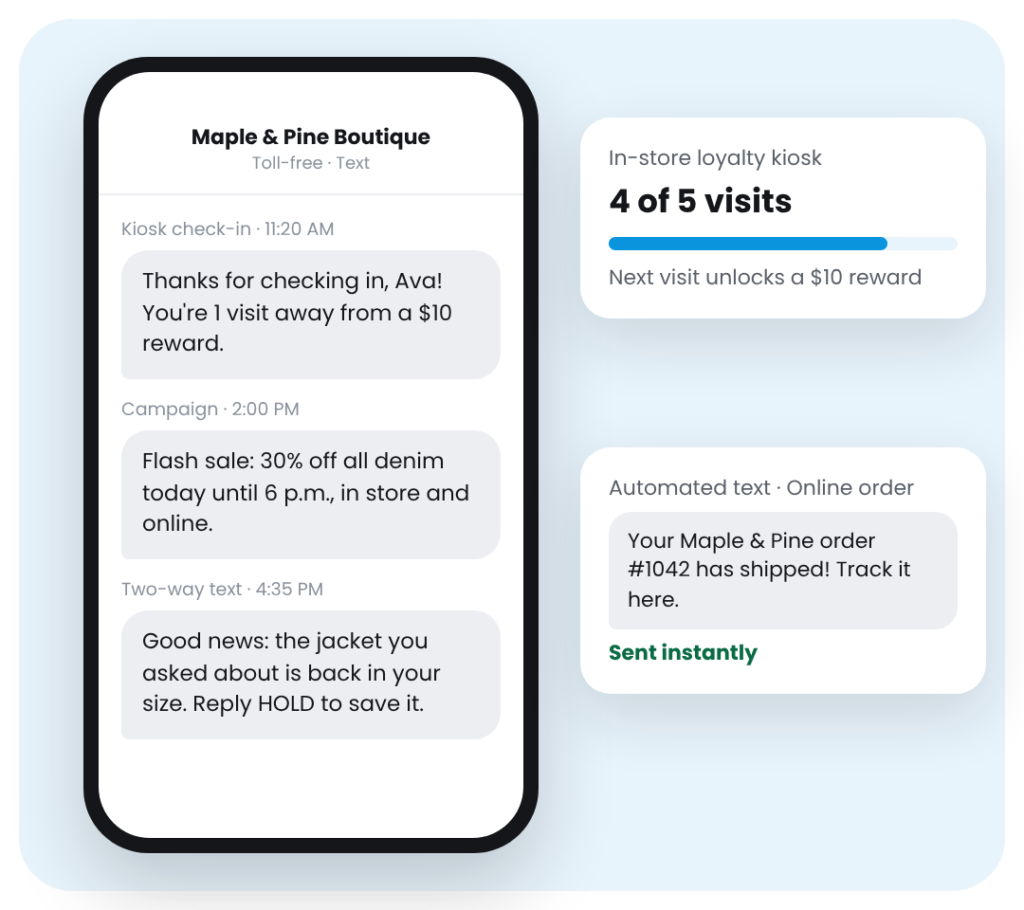
Flash sale: 30% off all [Category] today until 6 p.m., in store and online. Shop now: [link] – [Store]
Just in: the new [Collection] is here. Text-club members see it first: [link] – [Store]
Good news, [Name]: the [Product] you asked about is back in stock in your size. Want us to hold one? Reply HOLD.
You’re on the list! Our [Event] sale opens to text members Friday at 9 a.m., a day before everyone else. [link]
Still thinking it over? Your cart is saved. Finish checking out today and get free shipping: [link] – [Store]
Your [Store] order #[Number] has shipped! Track it here: [link]
Your order is ready for pickup at [Location]. We’re open until [Time]. Show this text at the counter.
Nice! You’ve earned a $10 reward with your last check-in. It’s good on your next visit through [Date].
Happy birthday, [Name]! Enjoy 20% off one item this month, in store or online with code [code]. – [Store]
We miss you, [Name]! Come back this week and take $15 off a purchase of $50 or more. Show this text. – [Store]
Thanks for shopping with us today! Would you leave a quick Google review? [link] – [Store]
See how the in-store loyalty kiosk works
Plans from $59 a month. Every plan includes a toll-free number and US-based phone support.
How to build your retail text list
Loyalty kiosk at checkout
Customers check in for rewards and join your list in seconds.
Signs at the register
Promote a keyword like “Text SAVE to [number]” for 15% off today.
Website pop-up and checkout
Offer a first-order discount and add an opt-in checkbox at checkout.
Receipts, email and social
Print your keyword on receipts and share it with email subscribers and followers.
Loyalty rewards and the in-store kiosk
A countertop kiosk turns every visit into a check-in. Shoppers earn rewards automatically, get a birthday offer and receive a win-back text when they have not been in for a while.
Every iVision Mobile plan includes the kiosk software, and qualifying brick-and-mortar stores receive the kiosk hardware.
SMS for grocery, specialty and multi-location stores
Grocery and specialty stores use texts for weekly specials, holiday ordering and pickup-ready alerts. Retailers with several locations can segment their list by store, so each customer hears about the sales and events closest to them.
Measuring retail SMS results
Track delivery rate, link clicks, coupon redemptions and replies. Redemptions and online orders are the clearest signal: they tie each text directly to a sale.
Retail texting rules
- Get written consent before sending marketing texts: a form checkbox, a keyword people text to join, or a kiosk submission.
- Register your number with carriers (10DLC), or use a verified toll-free number.
- Identify your business and include "Reply STOP to opt out" in every first message.
- Send between 8 a.m. and 9 p.m. in the recipient’s time zone. Some states set stricter limits.
- Follow the TCPA and state laws, and remove anyone who opts out right away.
This guide is not legal advice. Read the SMS compliance guide →
Frequently asked questions
Does SMS marketing work for retail?
Yes. Texts reach shoppers directly and quickly, which suits flash sales, new arrivals and reward reminders. Family Center Farm & Home grew its loyalty program to 60,000+ members with a 19% coupon redemption rate.
How do retail stores get customers to sign up for texts?
Offer a reason to join, like 15% off today. Use a loyalty kiosk at checkout, a keyword on register signs and receipts, and a pop-up and checkout checkbox on your website.
What should a retail store text customers?
Flash sales, new arrivals, back-in-stock alerts, VIP early access, loyalty rewards, birthday offers, order and pickup updates, and review requests.
How often should retailers send texts?
2 to 4 times a month for most stores, with more around big sales and holidays. Order and pickup updates don’t count toward that, since customers expect them.
Can SMS work with Shopify or our POS?
Yes. iVision Mobile connects with Shopify and other tools through integrations and its API; contact us to check your POS.
How much does SMS marketing cost for a retail store?
iVision Mobile plans start at $59 a month and include every feature, a toll-free number and phone support. Qualifying brick-and-mortar stores also get the loyalty kiosk hardware.
Turn shoppers into repeat customers
Try iVision Mobile free for 14 days. No credit card required.